
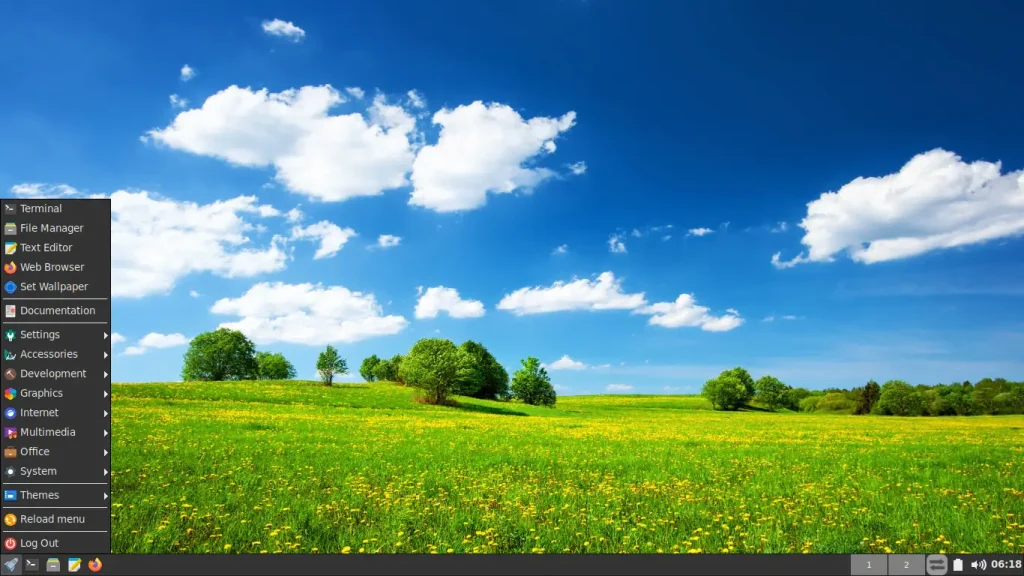
We are pleased to announce the availability of FunOS 26.04 LTS (Resolute Raccoon) Snapshot 2.
This is the second development snapshot in the FunOS 26.04 LTS release cycle, intended for testing, development, and early feedback.
Snapshot releases provide an early look at upcoming changes and improvements planned for the final FunOS 26.04 LTS release. This snapshot is not recommended for production use.
Release Date
December 15, 2025
What’s Included in Snapshot 2
Snapshot 2 brings incremental improvements and alignment with the Ubuntu 26.04 development base:
- Updated packages
Core system packages have been refreshed with the latest updates from the Ubuntu 26.04 repository. - Volume Icon package change
The volume icon now usesvolumeicon-alsafrom the Ubuntu 26.04 repository.
Previously, FunOS usedvolumeicon-alsa-legacyfrom the AntiX Linux repository.
This change improves consistency, long-term maintainability, and compatibility with the Ubuntu LTS base.
Download
You can download the ISO image here:
👉 FunOS 26.04 LTS Snapshot 2 (ISO)
https://sourceforge.net/projects/funos/files/resolute/snapshots/26.04/funos-26.04-snapshot2.iso/download
Known Issues
Ubiquity Cursor Issue in Live Session
When selecting “Try FunOS” (Live Session) and launching the Ubiquity installer from the desktop, the mouse cursor may not visually change (for example, showing a spinning or busy cursor) during installation steps.
This issue is related to how Ubiquity interacts with lightweight window managers such as JWM and does not affect the actual installation process.
Recommended Solution
For the best installation experience, it is strongly recommended to:
✔ Choose “Install FunOS” directly from the boot menu, instead of launching the installer from the live desktop.
This avoids cursor display issues during installation.
For more details and troubleshooting steps, please see:
👉 Avoid Cursor Issues When Installing FunOS
https://funos.org/install-funos-avoid-live-cursor-issue/
Important Notes
- Snapshot 2 is a development release, not a final or stable version.
- Bugs, incomplete features, and changes are expected.
- Suitable for testers, developers, and users who want to explore the upcoming FunOS 26.04 LTS base.
For a stable daily-use system, please continue using FunOS 24.04.3 LTS or FunOS 25.10.
What’s Next
Development of FunOS 26.04 LTS will continue with future snapshots, bringing:
- Further package updates
- Additional system refinements
- Improved stability
- Preparation for the final LTS release
Your feedback and testing are greatly appreciated and help improve the final FunOS 26.04 LTS release.
Post-Install Tips (Important)
After completing the installation of FunOS 26.04 LTS (Resolute Raccoon) Snapshot 2, and after rebooting and logging in to the desktop, users are strongly advised to perform the following steps to ensure the best experience.
1. Reload the Menu
After installation, the “Install FunOS 26.04” menu entry may still appear in the JWM menu. This is normal behavior for live-installer based systems and can be resolved by reloading the menu.
How to reload the menu:
- Click Menu in the bottom-left corner of the screen
- Click Reload menu
After reloading, the installer menu entry will be removed.
2. Switch to the Main Ubuntu Archive (Recommended)
FunOS 26.04 Snapshot 2 is based on Ubuntu 26.04 (Resolute), which is still in the development phase.
Some country mirrors may not provide timely updates for development releases.
To ensure you receive the latest package updates, it is recommended to switch to the main Ubuntu archive.
Steps to change the repository
- Open Terminal
- Remove old repository files
sudo rm -f /etc/apt/sources.list
sudo rm -f /etc/apt/sources.list.d/ubuntu.sources- Create a new Ubuntu sources file
sudo mousepad /etc/apt/sources.list.d/ubuntu.sources- Paste the following content into the file
Types: deb
URIs: http://archive.ubuntu.com/ubuntu/
Suites: resolute resolute-updates resolute-backports
Components: main restricted universe multiverse
Signed-By: /usr/share/keyrings/ubuntu-archive-keyring.gpg

Types: deb
URIs: http://security.ubuntu.com/ubuntu/
Suites: resolute-security
Components: main restricted universe multiverse
Signed-By: /usr/share/keyrings/ubuntu-archive-keyring.gpg- Save the file and close Mousepad
Update the system
After updating the repository configuration, run:
sudo apt update
sudo apt upgrade
sudo apt autoremove
sudo reboot
Why This Step Is Important
Using the main Ubuntu archive ensures:
- Faster access to package updates
- More consistent updates for development releases
- Better testing feedback for FunOS Snapshot users
This step is recommended for Snapshot releases only.
Once FunOS 26.04 reaches its final LTS release, users may switch back to a local country mirror if desired.